

Free AI Video Generator की मदद से अब आप सिर्फ़ एक text prompt लिखकर cinematic shots, product videos, YouTube B-roll और Reels के लिए छोटे clips बना सकते हैं। लेकिन 2026 में हर “free” tool का मतलब रोज़ मिलने वाले credits नहीं है: कुछ प्लेटफ़ॉर्म limited daily credits देते हैं, कुछ सिर्फ़ one-time trial देते हैं, और कुछ free account पर video generation के लिए अलग credit pack माँगते हैं। इस गाइड में Kling AI, Runway Gen-3, Luma Dream Machine, Pika और MiniMax Hailuo AI की practical तुलना, free tier की हक़ीक़त, text-to-video का आसान तरीका और copy-paste prompts दिए गए हैं।
अपडेट नोट: यह लेख 26 अक्टूबर 2026 के आसपास उपलब्ध official pricing/help pages और recent tool research पर आधारित है। AI tools की pricing, models और free credits तेज़ी से बदलते हैं; sign up करने के बाद अपने account में दिखाई गई credit cost और usage terms को अंतिम मानें।
Free AI Video Generator चुनने से पहले 3 बातें समझें
पहली बात, free plan और free trial अलग हैं। Free plan में credits रोज़ या हर महीने लौट सकते हैं; trial में एक बार credits मिलते हैं और ख़त्म होने पर आगे paid plan लेना पड़ सकता है। दूसरी बात, preview में video HD जैसा दिखने से यह ज़रूरी नहीं कि downloaded file भी 1080p हो। Resolution, duration और watermark की शर्तें plan के हिसाब से बदलती हैं। तीसरी बात, personal use और commercial use एक नहीं हैं। YouTube monetization, client work या paid ads के लिए इस्तेमाल करने से पहले tool का license पढ़ें।
अच्छे results के लिए prompt में पाँच बातें लिखें: subject, action, location, camera movement और lighting/style. सिर्फ़ “एक आदमी सड़क पर चल रहा है” लिखने के बजाय बताएं कि वह कहाँ चल रहा है, कैमरा किस ओर move कर रहा है, मौसम कैसा है और दृश्य realistic चाहिए या stylized।
Top 5 Free AI Video Generator Tools in 2026
1. Kling AI — cinematic motion और realistic scenes के लिए
किसके लिए अच्छा है: cinematic B-roll, travel shots, dramatic camera movement, realistic character motion और product visuals। Kling में text-to-video के साथ image-to-video और reference-based creation जैसे options भी मिलते हैं। नए model versions में subject reference और motion control जैसे features से किसी character या product की look को स्थिर रखने में मदद मिल सकती है।
Free credits और limits: Kling की official information free access और daily credits का ज़िक्र करती है, लेकिन exact quantity account, promotion, model और region के हिसाब से बदल सकती है। third-party reports में 66 credits/day का आंकड़ा मिलता रहा है; इसे हर account के लिए guarantee न मानें। Free generations पर watermark और queue में इंतज़ार हो सकता है। 1080p/4K, लंबे clips और advanced models के लिए membership की ज़रूरत पड़ सकती है। Credits खर्च करने से पहले generation panel में दिखाई गई cost देखें।
फायदे: cinematic camera movement, realistic motion, image reference से शुरुआत और अलग-अलग shot styles. कमियाँ: free queue धीमी हो सकती है, watermark आ सकता है और कई attempts में credits जल्दी खर्च हो सकते हैं।
आसान तरीका: Kling की official site पर account बनाएँ, Video Generation में text-to-video चुनें, prompt लिखें, aspect ratio और duration सेट करें, फिर Generate दबाएँ। अगर scene में एक खास इंसान या product चाहिए तो पहले reference image दें और जहाँ उपलब्ध हो Element/Subject Reference चुनें।
Kling AI की official website खोलें.
2. Runway Gen-3 — पुराना model, लेकिन जानकारी जानना ज़रूरी
पहले यह साफ़ कर लें: Runway Gen-3 Alpha और Gen-3 Alpha Turbo को 2026 में retire कर दिया गया। Runway की official help page के अनुसार Gen-3 Alpha 8 जुलाई 2026 और Gen-3 Alpha Turbo 30 जुलाई 2026 से उपलब्ध नहीं रहे। इसलिए नए users को Gen-3 को मौजूदा free text-to-video विकल्प समझकर नहीं चलना चाहिए। आज text-to-video के लिए Runway Gen-4.5 जैसे newer options की तरफ़ जाना होगा। फिर भी Gen-3 का नाम search में आता है और पुराने tutorials इसे अभी भी recommend करते हैं, इसलिए यह अंतर समझना ज़रूरी है।
Free credits और limits: Runway के official Free plan में 125 one-time credits और 5GB asset storage का ज़िक्र है। यह monthly refill नहीं है। Free plan में models और tools की उपलब्धता बदल सकती है; हर model free tier में शामिल नहीं होता। Free plan से निकले videos पर watermark होता है और credits ख़रीदने के लिए plan upgrade करना पड़ सकता है। Gen-3 retired होने के बाद उसकी पुरानी generation cost या prompt tutorial को current availability न समझें।
फायदे: generation और editing का एक बड़ा creative workspace, media organization और कई production tools. कमियाँ: one-time credits जल्दी ख़त्म हो सकते हैं; कुछ models केवल paid plan में हैं; Gen-3 अब नए generation के लिए retired है।
काम शुरू कैसे करें: Runway account बनाएँ, dashboard में Text to Video या Gen-4.5 देखें, model की current availability confirm करें, prompt और settings चुनें, और credits खर्च करने से पहले output length तथा cost पढ़ें। अगर tutorial में Gen-3 दिखाई दे तो UI अलग होने पर उसी पुराने flow को follow न करें।
Runway की official website खोलें.
3. Luma Dream Machine — image animation और smooth motion के लिए
किसके लिए अच्छा है: still image को moving shot बनाना, product scene में हल्का camera move, atmospheric visuals और concept clips। Luma की Dream Machine में camera motion, keyframes, extend और modify जैसे workflows रहे हैं; उपलब्ध feature आपके plan और current model पर निर्भर कर सकता है।
Free credits और limits: Luma के updated subscription guide में Free plan को सीमित बताया गया है: image creation और Ray3.14 video draft resolution जैसे options तक access हो सकता है। Free output में watermark हो सकता है और use personal projects तक सीमित है। Official guide में free tier के लिए कोई तय मासिक video-credit संख्या नहीं दी गई, इसलिए पुराने articles में दिखने वाले “इतने free generations हर महीने” को universal guarantee न मानें। Paid tiers में monthly credits, priority processing और commercial rights की अलग शर्तें हैं।
फायदे: still image से motion बनाना, camera control के जरिए shot को direct करना और कई iterations के लिए उपयोगी workflow. कमियाँ: free video generation सीमित हो सकती है, watermark और personal-use restriction लागू हो सकती है, और final resolution plan पर निर्भर करता है।
कैसे बनाएँ: Dream Machine में नया creation खोलें। Text prompt से शुरू करें या image input दें। अगर image animate कर रहे हैं तो लिखें कि image में क्या बदले और क्या स्थिर रहना चाहिए—जैसे “camera slowly pushes in, trees sway gently, keep the building unchanged.” छोटे prompt changes करके दो-तीन versions compare करें।
4. Pika — creative effects और छोटे social clips के लिए
किसके लिए अच्छा है: stylized effects, short social videos, image animation और playful edits. Pika के apps में Pika effects, swaps/additions और अलग-अलग video models जैसे options मिलते रहे हैं; कौन-सा feature आपके account में दिखाई देगा, इसे current interface में check करें।
Free credits और limits: यहाँ पुरानी जानकारी से सावधान रहें। Pika की current official pricing page पर Free plan के लिए 0 credits/month — packs only लिखा है। यानी free account बनाया जा सकता है, लेकिन monthly generation allowance शामिल नहीं है; वीडियो बनाने के लिए credit pack की ज़रूरत पड़ सकती है। उसी page के अनुसार Free plan पर watermark-free output का विकल्प दिखता है, लेकिन commercial license, priority queue और early access शामिल नहीं हैं। यह paid credits की ज़रूरत को ख़त्म नहीं करता। पुराने Pika pages पर 80 monthly credits वाला विवरण भी मिल सकता है, इसलिए वर्तमान pricing page को प्राथमिकता दें।
फायदे: effect-driven clips, सरल interface और creative edits. कमियाँ: free plan का monthly credit balance शून्य दिखाया गया है; commercial use की अनुमति free tier में शामिल नहीं है; हर model/setting की credit cost अलग हो सकती है।
कैसे इस्तेमाल करें: Pika पर account खोलें, Video Studio या उपयुक्त app चुनें, prompt या image upload करें और settings चुनें। Generate दबाने से पहले estimated credit cost देखें। अगर credits नहीं हैं, तो prompt तैयार कर लें और credit pack खरीदने से पहले अपनी ज़रूरत व license terms जाँचें।
Pika की official website खोलें.
5. MiniMax Hailuo AI — realistic motion और product shots के लिए
किसके लिए अच्छा है: realistic movement, product scenes, nature shots और ऐसे clips जिनमें objects का वजन, पानी, धुआँ या कपड़े की movement believable दिखनी चाहिए। Hailuo text-to-video और image-to-video के लिए जाना जाता है; model version के हिसाब से output quality और duration बदल सकते हैं। MiniMax के official developer resources बताते हैं कि Hailuo video models उसके web app और API ecosystem में उपलब्ध हैं।
Free credits और limits: Hailuo की official साइट ने Hailuo 2.3 launch week के दौरान daily trial credits देने की बात कही थी; ये credits हर 24 घंटे में refresh होते थे और पहले सप्ताह तक सीमित थे। इसे permanent daily free allowance न समझें; current account में credits उपलब्ध हैं या नहीं, यह verify करें। Video generation की credit cost model, resolution और duration पर निर्भर करती है; official model page examples के तौर पर 768p/6s के लिए 25 credits और 1080p/6s के लिए 50 credits दिखाती है, लेकिन current pricing panel को check करना ज़रूरी है। Free outputs पर watermark, short duration और queue delay हो सकता है। API access और web app subscription अलग billing systems हैं; API के credits को web app के free credits न समझें।
फायदे: natural motion, photorealistic look और product demo/B-roll के लिए अच्छा शुरुआती विकल्प. कमियाँ: clips छोटे हो सकते हैं, free credits बदलते रहते हैं, audio और resolution पर plan restrictions हो सकती हैं, और watermark commercial projects के लिए दिक्कत बन सकता है।
कैसे बनाएँ: Hailuo की international web app खोलें, text-to-video या image-to-video चुनें, prompt में subject, action, lens/camera और lighting बताएँ। Generate करने से पहले free balance और output setting देखें। result में हाथ, चेहरे, text और physics को ध्यान से जाँचें; खराब shot को editing से छिपाने के बजाय prompt बदलकर दोबारा generate करें।
Hailuo AI की official website खोलें.
पाँचों tools की Comparison Table
नीचे की table में free access के बारे में verified official जानकारी और जहाँ exact number प्रकाशित नहीं है वहाँ सावधानी रखी गई है। “Free” का मतलब unlimited production नहीं है।
| Tool | सबसे अच्छा काम | Free credits/access | Watermark / उपयोग | मुख्य limit |
|---|---|---|---|---|
| Kling AI | Cinematic motion, realistic scenes | Daily credits; exact allowance account में जाँचें | Free output पर watermark हो सकता है | Queue, credit usage और model-based limits |
| Runway Gen-3 | पुराने tutorials/legacy workflow | Runway Free: 125 one-time credits, पर Gen-3 retired | Free output पर watermark | Gen-3 Alpha 8 Jul 2026 और Turbo 30 Jul 2026 को retire |
| Luma Dream Machine | Image-to-video, camera motion | Limited free access; fixed credit count official guide में साफ़ नहीं | Watermark और personal-use limit हो सकती है | Draft access तथा plan-dependent resolution/features |
| Pika | Effects और social clips | Official pricing: 0 monthly credits; packs only | No watermark listed; no commercial license on Free | Video बनाने के लिए pack की ज़रूरत पड़ सकती है |
| MiniMax Hailuo AI | Photorealism, product motion | Daily free credits; exact amount बदल सकता है | Free output पर watermark हो सकता है | Short clips, queue और plan-based limits |
एक नज़र में सुझाव: cinematic camera movement के लिए Kling आज़माएँ; natural product motion के लिए Hailuo; still image animate करने के लिए Luma; effects के लिए Pika. Runway को चुनते समय Gen-3 की जगह current model availability देखें। अगर आपकी ज़रूरत लगातार free generation है, तो हर tool के credit counter और licensing rules को compare करने के बाद ही workflow तय करें।
Text से Realistic HD Video बनाने का Step-by-Step तरीका
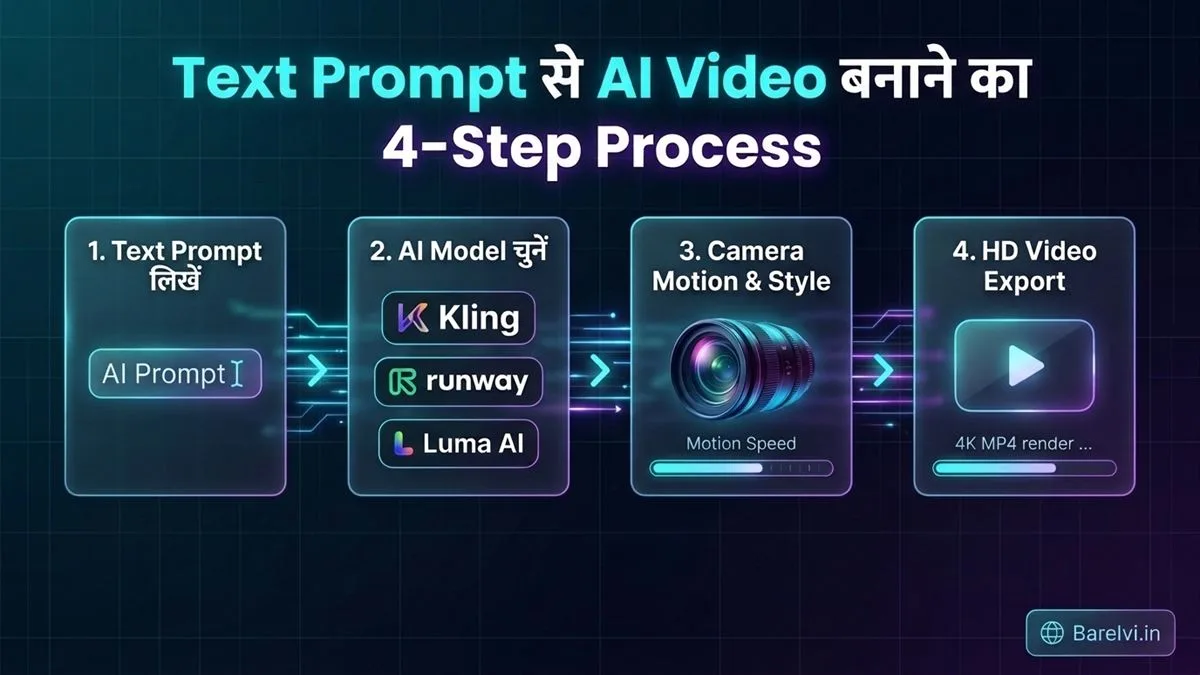
Step 1: पहले video का use तय करें
YouTube long video के लिए 16:9 landscape, Shorts/Reels के लिए 9:16 vertical चुनें। Product ad में product साफ़ दिखना चाहिए; travel B-roll में mood और camera movement ज़्यादा अहम हैं। शुरुआत में 5–8 सेकंड का एक shot बनाने का लक्ष्य रखें—इससे prompt test करना आसान रहेगा।
Step 2: Prompt को चार हिस्सों में लिखें
पहला, subject: “a red vintage motorcycle”. दूसरा, action: “drives slowly on a wet mountain road”. तीसरा, camera: “low tracking shot, camera follows from front-left”. चौथा, lighting और style: “overcast dawn, realistic reflections, cinematic natural color”. एक prompt में बहुत सारे अलग actions जोड़ने से AI confused हो सकता है।
Step 3: सही tool और model चुनें
Realistic motion चाहिए तो Kling या Hailuo से शुरुआत करें। Image-to-video चाहिए तो अपनी साफ़ reference image के साथ Luma या Kling test करें। Effects चाहिए तो Pika देखें। Runway का उपयोग करते समय current model selector check करें, क्योंकि Gen-3 retired है।
Step 4: Duration, aspect ratio और quality सेट करें
पहले short draft बनाएँ। Vertical video में subject को center या safe area में रखें, ताकि captions और UI से वह ढके नहीं। अगर settings में 720p, 1080p या draft quality दिखाई देती है तो उपलब्ध plan के हिसाब से चुनें। सिर्फ़ prompt में “8K” लिखने से output 8K नहीं बनता—असल resolution export settings तय करती हैं।
Step 5: Generate करने से पहले credits देखें
Generation शुरू करने से पहले estimated credit cost पढ़ें। एक ही prompt के कई versions बनाना महँगा पड़ सकता है। Free allowance कम हो तो पहले text को सुधारें, फिर render करें। Tool की queue लंबी हो तो result आने में वक्त लग सकता है; बार-बार click करके duplicate jobs न भेजें।
Step 6: परिणाम को ध्यान से जाँचें
चेहरे, उँगलियाँ, दाँत, product logo, background text, shadows और object movement देखें। पानी, धुआँ और तेज़ camera motion में AI artifacts दिख सकते हैं। अगर character का चेहरा बदल रहा है तो reference image, simpler action और कम camera movement आज़माएँ। किसी असली व्यक्ति की likeness या logo इस्तेमाल करने से पहले permission और rights का ध्यान रखें।
Step 7: Edit करें, captions और voice-over जोड़ें
Generated clips को video editor में trim करें, shot transitions जोड़ें और voice-over/captions लगाएँ। एक ही AI clip को पूरा YouTube video बनाने के बजाय कई short shots, screen recordings, licensed stock footage और narration के साथ जोड़ें। Export के बाद mobile screen पर पूरा video देख लें।
Step 8: YouTube पर upload से पहले license पढ़ें
Free plan की personal-use restriction होने पर monetized YouTube channel के लिए वह clip इस्तेमाल करना अनुमति के बाहर हो सकता है। यह भी जाँचें कि watermark हटाना allowed है या नहीं, commercial rights कब शुरू होते हैं और generated content पर tool की terms क्या कहती हैं। YouTube पर AI content के बारे में disclosure नियम भी समय-समय पर बदल सकते हैं; upload screen में लागू policy पढ़ें।
वीडियो बनाने के लिए 3 Ready-to-use Prompts
नीचे के prompts को सीधे copy करके आज़माएँ। अलग model पर एक ही prompt के नतीजे अलग हो सकते हैं; बेहतर result के लिए एक बार में सिर्फ़ एक या दो details बदलें।
Prompt 1: Realistic Indian street cinematic shot (English)
कहाँ काम आएगा: travel, culture और lifestyle YouTube B-roll. अगर बहुत सारी गतिविधियाँ गड़बड़ हो रही हों तो prompt को simple करें: सिर्फ़ चाय डालने और camera push-in पर ध्यान दें।
Prompt 2: Product ad / gadget close-up (English)
कहाँ काम आएगा: gadgets, affiliate content और YouTube product explainers. असली brand का logo चाहिए तो उसे बाद में editing में जोड़ना ज़्यादा भरोसेमंद रहेगा।
Prompt 3: हिंदी prompt — पहाड़ों में sunrise travel shot
अगर हिंदी prompt ठीक follow न हो: इसी scene को English में लिखकर देखें। कई video models English camera terms जैसे slow dolly-in, tracking shot, shallow depth of field और natural motion को बेहतर समझ सकते हैं।
YouTube Creators के लिए 8 FAQs
1. 2026 में सबसे अच्छा Free AI Video Generator कौन-सा है?
हर काम के लिए एक ही winner नहीं है। Cinematic movement के लिए Kling, realistic product/nature motion के लिए Hailuo, image animation के लिए Luma और stylized effects के लिए Pika आज़मा सकते हैं। सबसे अच्छा चुनाव आपकी free allowance, watermark, output quality और license पर निर्भर है।
2. क्या text से सीधे 1080p HD video बन सकता है?
कई tools में HD export उपलब्ध है, लेकिन free plan पर draft या lower-resolution output मिल सकता है। Prompt में “1080p” लिखना resolution की guarantee नहीं देता। Download या export panel में वास्तविक resolution check करें।
3. क्या ये tools सच में free हैं?
कुछ tools limited free credits देते हैं, जबकि Runway के Free plan में one-time 125 credits हैं। Pika की current pricing page पर monthly free credits शून्य और credit packs का विकल्प दिया गया है। Free का मतलब unlimited generation नहीं है; current account limits देखकर ही योजना बनाएँ।
4. Runway Gen-3 अभी इस्तेमाल किया जा सकता है?
Runway की official help page के मुताबिक Gen-3 Alpha 8 जुलाई 2026 और Gen-3 Alpha Turbo 30 जुलाई 2026 को retire कर दिए गए। नए text-to-video काम के लिए Runway में current model, जैसे Gen-4.5, की availability देखें। पुराने YouTube tutorials के UI और pricing अब लागू न हों।
5. Free AI video पर watermark क्यों आता है?
कई platforms watermark को free tier की limit और paid plan का feature रखते हैं। कुछ tools no-watermark output दिखाते हैं, लेकिन उसके साथ commercial license शामिल हो यह ज़रूरी नहीं। Watermark हटाने के लिए third-party remover इस्तेमाल करने से पहले terms और ownership rights जाँचें।
6. क्या AI से बनाया video monetized YouTube channel पर डाल सकते हैं?
यह tool की license terms, आपकी input assets और YouTube की current policies पर निर्भर है। Free plan personal-use-only हो तो monetized content में इस्तेमाल करने की अनुमति नहीं हो सकती। Commercial use, attribution, watermark और synthetic/altered content disclosure की शर्तें upload से पहले पढ़ें।
7. AI video में चेहरा और हाथ खराब क्यों बनते हैं?
Video model हर frame में subject को दोबारा अनुमान लगाकर बनाता है, इसलिए तेज़ motion, बहुत सारे हाथों की activity, छोटे facial details और जटिल camera movement में distortion हो सकता है। Prompt को सरल रखें, एक मुख्य action चुनें, reference image लगाएँ और short clip से शुरुआत करें।
8. YouTube Shorts के लिए कौन-सी settings बेहतर हैं?
Vertical 9:16 ratio, center-safe composition और short clips से शुरुआत करें। मुख्य subject को किनारे पर न रखें क्योंकि platform UI और captions उसे ढक सकते हैं। Generated clip को editor में trim करें, subtitles जोड़ें और upload से पहले मोबाइल पर पूरा result देखें।
अंतिम सलाह: किस tool से शुरुआत करें?
अगर आपका लक्ष्य बिना शूटिंग के realistic B-roll बनाना है, तो पहले Kling और Hailuo के free access को compare करें। एक तस्वीर को animate करना है तो Luma आज़माएँ; playful social effects के लिए Pika देखें, मगर उसके वर्तमान free plan में monthly credits नहीं हैं। Runway के पुराने Gen-3 को current option मानने के बजाय नए model की availability जाँचें। शुरुआत में 5–8 सेकंड के clips बनाएँ, prompt साफ़ रखें और final video के लिए credits ख़र्च करने से पहले license व export resolution दोनों confirm करें।
डिस्क्लेमर: AI tools की pricing, credits, model access और usage rights बदल सकते हैं। यहाँ बताए गए free limits को account में उपलब्ध मौजूदा जानकारी से verify करें। Tool links official websites के लिए हैं; इस लेख में कोई paid endorsement नहीं है।
Official references और pricing pages
Credits, model access और license समय के साथ बदल सकते हैं। इस लेख को पढ़ते समय इन official pages पर ताज़ा जानकारी check करें:
- Kling AI — Free access और model limits
- Runway — Free plan में 125 one-time credits
- Runway — Gen-3 Alpha और Turbo retirement notice
- Luma Dream Machine — Plans और free access
- Luma — Ray3.14 Draft Mode और output details
- Pika — Current pricing, credits और commercial license
- Hailuo AI — Model specs और credit cost examples
Leave a Comment